

Integrating Foundational Time Series Models with PyMC-Marketing MMM#
This tutorial demonstrates how to combine Chronos-2, a pretrained time series forecasting model, with PyMC-Marketing Media Mix Models (MMM). The goal is to forecast sales when control variables are unavailable for future periods.
This tutorial is based on the original notebook by Luca Fiaschi.
The Problem#
When using MMM for forward-looking predictions, practitioners face a common challenge: control variables are often unavailable for future periods. Consider a scenario where your MMM includes employment rates and temperature as controls. These variables help the model separate media effects from external factors, but when planning next quarter’s media budget, you don’t yet have next quarter’s employment or temperature data.
This creates a practical dilemma:
Without controls: Predictions may be biased because the model expects control inputs
With naive assumptions (e.g., using last known values): Predictions degrade as the forecast horizon extends
The Approach#
This tutorial presents a two-model technique:
Train an MMM on historical data to learn the causal relationships between media spend, controls, and sales
Use Chronos-2 to forecast the control variables into the future period
Combine the forecasted controls with planned media spend to generate sales predictions
Evaluate how forecast errors in controls propagate to sales predictions
This approach combines the best of two worlds: a general-purpose foundation model that accurately predict the future state of covariates, and a specialized Bayesian MMMs that explicitly model marketing effects and allow for causal interpretation.
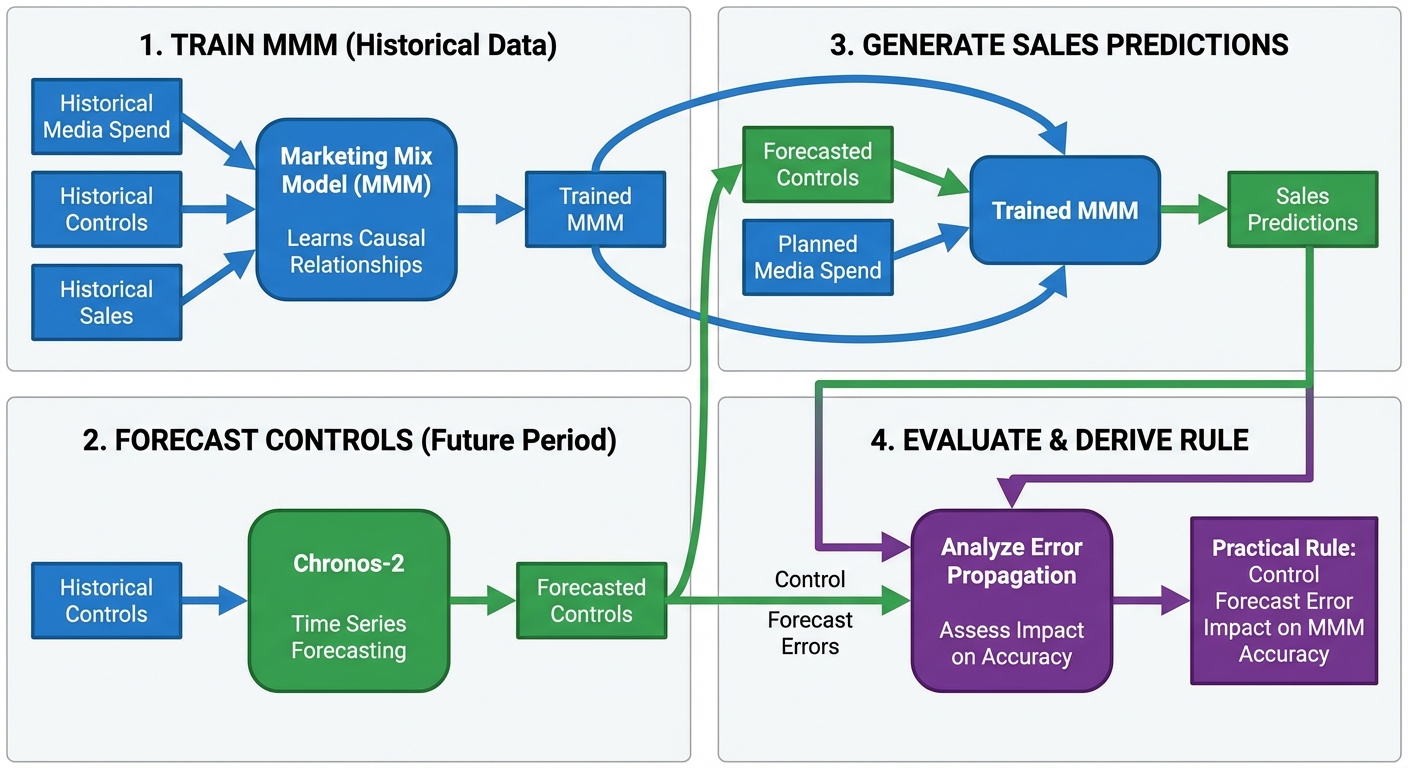
We also derive a practical rule for estimating how much control forecast error affects MMM accuracy, helping practitioners set appropriate forecasting targets.
Background and Prerequisites#
Before diving into the implementation, let’s briefly review the key concepts.
Media Mix Modeling (MMM)#
MMM is a statistical technique used to measure the effectiveness of marketing channels. A typical MMM decomposes sales into:
where:
\(y_t\) is the target variable (e.g., sales) at time \(t\)
\(f_c(\cdot)\) captures the nonlinear effect of media channel \(c\), typically including adstock (carryover effects) and saturation (diminishing returns)
\(z_{j,t}\) are control variables (e.g., economic indicators, weather, holidays)
\(\gamma_j\) are the coefficients for control variables
\(\varepsilon_t\) is the error term
Control variables are external factors that influence sales but are not marketing activities. Including them helps isolate the true media effects from confounding factors.
For more information on MMM, see the example notebooks MMM Example Notebook and MMM End-to-End Case Study.
Foundational Time Series Models#
Chronos-2 is a pretrained time series model developed by Amazon that can generate forecasts without task-specific training (zero-shot forecasting). Key characteristics:
Handles univariate, multivariate, and covariate-informed forecasting
Uses a group attention mechanism for in-context learning across related series
Trained on diverse synthetic datasets to generalize across domains
In this tutorial, we use Chronos-2 to forecast control variables (employment, temperature) that exhibit predictable temporal patterns.
What This Tutorial Covers#
Setting up a multi-dimensional MMM with PyMC-Marketing
Using Chronos-2 for zero-shot forecasting of control variables
Evaluating how forecast errors propagate through the MMM
Practical guidelines for setting forecast accuracy targets
What This Tutorial Does Not Cover#
MMM model selection and validation (see PyMC-Marketing documentation)
Hyperparameter tuning for Chronos-2
Budget optimization using MMM results
Setup#
Warning
To run this notebook you can go to the original notebook https://github.com/lfiaschi/advanced-pymc-marketing-examples/blob/main/notebooks/07_chronos_pymc_marketing.ipynb and install the dependencies.
Import the required libraries. Key dependencies:
pymc_marketing: Bayesian MMM implementationchronos: Amazon’s pretrained time series modelspolars: Fast DataFrame operationsrich: Enhanced console output for tables and progress
import warnings
from pathlib import Path

import matplotlib.pyplot as plt
import numpy as np
import pandas as pd
import polars as pl
import torch
from chronos import Chronos2Pipeline
from rich import print as rprint
from rich.console import Console
from rich.table import Table

from pymc_marketing.mmm import GeometricAdstock, LogisticSaturation
from pymc_marketing.mmm.multidimensional import MMM

warnings.filterwarnings("ignore")

plt.rcParams["figure.figsize"] = [12, 7]
plt.rcParams["figure.dpi"] = 100

console = Console()

%load_ext autoreload
%autoreload 2
%config InlineBackend.figure_format = "retina"
/Users/juanitorduz/Documents/advanced-pymc-marketing-examples/.venv/lib/python3.12/site-packages/pymc_marketing/mmm/multidimensional.py:215: FutureWarning: This functionality is experimental and subject to change. If you encounter any issues or have suggestions, please raise them at: https://github.com/pymc-labs/pymc-marketing/issues/new
  warnings.warn(warning_msg, FutureWarning, stacklevel=1)
Load and Explore Data#
We use a synthetic dataset designed to illustrate the key concepts. The data simulates a realistic MMM scenario with:
Variable |
Description |
|---|---|
|
Weekly timestamp (208 weeks, ~4 years) |
|
US state identifier (50 states) |
|
TV advertising spend |
|
Search advertising spend |
|
Average temperature (control variable with seasonal pattern) |
|
Employment rate (control variable with trend + noise) |
|
Sales (target variable) |
The sales variable was generated using a known MMM formula, which allows us to evaluate how well the approach recovers the true relationships. In practice, you would use real data where the ground truth is unknown.
# Load data
data_path = Path(
    "https://raw.githubusercontent.com/lfiaschi/advanced-pymc-marketing-examples/main/data/mmm-chronos/mmm_chronos_data.csv"
)
df = pl.read_csv(data_path).with_columns(pl.col("week").str.to_date())

rprint("[bold green]Data loaded successfully[/bold green]")
rprint(f"Shape: {df.shape[0]} rows × {df.shape[1]} columns")
rprint(f"Date range: {df['week'].min()} to {df['week'].max()}")
rprint(f"Number of states: {df['state'].n_unique()}")
rprint(f"\nColumns: {df.columns}")


# Preview first few rows
def display_data_preview(df: pl.DataFrame, n: int = 5) -> None:
    """Display a preview of the dataframe using Rich Table."""
    table = Table(title="Data Preview", show_header=True, header_style="bold magenta")

    # Add columns
    for col in df.columns:
        table.add_column(str(col))

    # Add rows
    for row in df.head(n).iter_rows():
        table.add_row(*[str(v) for v in row])

    console.print(table)


display_data_preview(df)
Data loaded successfully
Shape: 10400 rows × 7 columns
Date range: 2020-01-12 to 2023-12-31
Number of states: 50
Columns: ['week', 'state', 'avg_temp', 'avg_employment', 'tv_spend', 'search_spend', 'y']
                                        Data Preview
┏━━━━━━━━━━━━┳━━━━━━━━━━━━┳━━━━━━━━━━┳━━━━━━━━━━━━━━━━┳━━━━━━━━━━┳━━━━━━━━━━━━━━┳━━━━━━━━━━┓
┃ week       ┃ state      ┃ avg_temp ┃ avg_employment ┃ tv_spend ┃ search_spend ┃ y        ┃
┡━━━━━━━━━━━━╇━━━━━━━━━━━━╇━━━━━━━━━━╇━━━━━━━━━━━━━━━━╇━━━━━━━━━━╇━━━━━━━━━━━━━━╇━━━━━━━━━━┩
│ 2020-01-12 │ New Jersey │ 40.2     │ 0.9531         │ 15201.77 │ 6518.94      │ 47344.14 │
│ 2020-01-19 │ New Jersey │ 32.6     │ 0.9528         │ 14082.6  │ 5496.16      │ 47458.42 │
│ 2020-01-26 │ New Jersey │ 35.8     │ 0.9533         │ 13779.59 │ 3919.59      │ 47367.3  │
│ 2020-02-02 │ New Jersey │ 41.4     │ 0.9552         │ 14238.66 │ 3133.07      │ 47360.27 │
│ 2020-02-09 │ New Jersey │ 37.1     │ 0.9611         │ 15145.33 │ 2515.58      │ 47372.65 │
└────────────┴────────────┴──────────┴────────────────┴──────────┴──────────────┴──────────┘
Visualize Time Series Patterns#
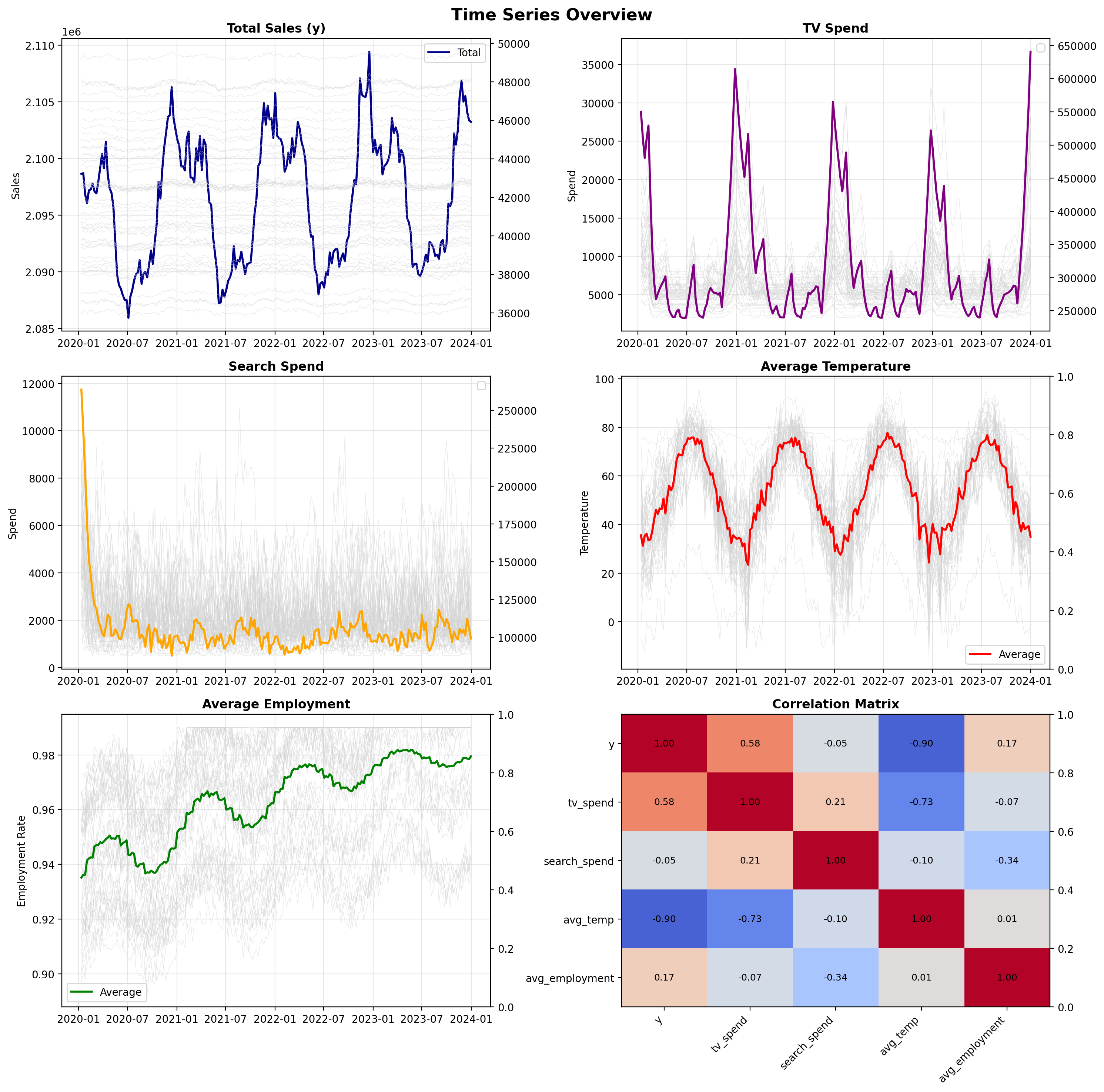
Before modeling, we examine the temporal patterns in our data. Key observations to look for:
Seasonality: Temperature shows clear annual cycles; employment may have subtler patterns
Trends: Employment rates may drift over time
Correlation structure: Understanding how variables relate helps interpret model results
The visualization below shows aggregated time series (bold lines) with individual state series in the background (gray lines). This reveals both the overall patterns and the cross-sectional variation.
✓ Time series visualization complete
# Create summary table of average spend by state
non_null_y_count = df.filter(pl.col("y").is_not_null()).shape[0]
total_count = df.shape[0]
rprint(
    f"[yellow]Data check:[/yellow] {non_null_y_count} non-null sales values out of {total_count} total rows"
)

# Aggregate spend and sales data
spend_summary = (
    df.group_by("state")
    .agg(
        [
            pl.col("tv_spend").mean().alias("Avg TV Spend"),
            pl.col("search_spend").mean().alias("Avg Search Spend"),
            (pl.col("tv_spend") + pl.col("search_spend"))
            .mean()
            .alias("Avg Total Spend"),
            pl.col("y").mean().alias("Avg Sales"),
        ]
    )
    .sort("Avg Total Spend", descending=True)
)

# Display using Rich table
table = Table(
    title="Average Media Spend by State", show_header=True, header_style="bold magenta"
)
table.add_column("State", style="cyan", no_wrap=True)
table.add_column("Avg TV Spend", justify="right", style="green")
table.add_column("Avg Search Spend", justify="right", style="blue")
table.add_column("Avg Total Spend", justify="right", style="yellow")
table.add_column("Avg Sales", justify="right", style="magenta")

for row in spend_summary.iter_rows(named=True):
    avg_sales = row.get("Avg Sales")
    sales_str = (
        f"${avg_sales:,.2f}"
        if avg_sales is not None and not np.isnan(avg_sales)
        else "$nan"
    )

    table.add_row(
        row["state"],
        f"${row['Avg TV Spend']:,.2f}",
        f"${row['Avg Search Spend']:,.2f}",
        f"${row['Avg Total Spend']:,.2f}",
        sales_str,
    )

console.print(table)
rprint(
    f"\n[bold green]✓[/bold green] Average spend summary for {len(spend_summary)} states"
)
Data check: 10400 non-null sales values out of 10400 total rows
                           Average Media Spend by State
┏━━━━━━━━━━━━━━━━┳━━━━━━━━━━━━━━┳━━━━━━━━━━━━━━━━━━┳━━━━━━━━━━━━━━━━━┳━━━━━━━━━━━━┓
┃ State          ┃ Avg TV Spend ┃ Avg Search Spend ┃ Avg Total Spend ┃  Avg Sales ┃
┡━━━━━━━━━━━━━━━━╇━━━━━━━━━━━━━━╇━━━━━━━━━━━━━━━━━━╇━━━━━━━━━━━━━━━━━╇━━━━━━━━━━━━┩
│ Texas          │   $13,119.02 │        $3,488.64 │      $16,607.65 │ $44,563.98 │
│ New York       │   $11,110.87 │        $3,232.43 │      $14,343.30 │ $40,571.07 │
│ North Carolina │   $10,442.48 │        $2,585.67 │      $13,028.15 │ $36,077.00 │
│ California     │   $10,168.02 │        $2,853.00 │      $13,021.02 │ $46,568.23 │
│ Virginia       │   $10,028.41 │        $2,776.01 │      $12,804.43 │ $41,167.96 │
│ Florida        │    $8,662.81 │        $3,671.72 │      $12,334.53 │ $46,058.95 │
│ Michigan       │    $9,526.88 │        $2,208.14 │      $11,735.02 │ $43,541.15 │
│ Washington     │    $9,266.80 │        $2,318.26 │      $11,585.06 │ $45,027.23 │
│ Ohio           │    $8,592.62 │        $2,652.97 │      $11,245.59 │ $47,810.30 │
│ Arizona        │    $8,540.73 │        $2,396.62 │      $10,937.35 │ $37,023.59 │
│ Massachusetts  │    $8,453.45 │        $2,237.68 │      $10,691.13 │ $38,583.65 │
│ Maryland       │    $7,818.03 │        $2,811.47 │      $10,629.50 │ $38,382.23 │
│ Georgia        │    $8,134.42 │        $2,452.15 │      $10,586.57 │ $49,311.96 │
│ New Jersey     │    $7,815.47 │        $2,533.53 │      $10,349.00 │ $47,395.09 │
│ Tennessee      │    $7,057.37 │        $2,991.86 │      $10,049.22 │ $36,561.22 │
│ Pennsylvania   │    $7,011.23 │        $2,591.39 │       $9,602.62 │ $36,522.99 │
│ Illinois       │    $6,918.14 │        $2,527.18 │       $9,445.32 │ $41,458.58 │
│ Indiana        │    $6,783.76 │        $2,466.04 │       $9,249.80 │ $42,577.13 │
│ Colorado       │    $7,241.18 │        $1,940.75 │       $9,181.93 │ $42,659.58 │
│ Alabama        │    $6,741.88 │        $2,079.21 │       $8,821.09 │ $42,608.70 │
│ Utah           │    $6,296.27 │        $2,010.29 │       $8,306.56 │ $42,697.24 │
│ Minnesota      │    $5,863.78 │        $2,423.63 │       $8,287.42 │ $43,886.93 │
│ Wisconsin      │    $6,133.24 │        $2,137.53 │       $8,270.77 │ $38,823.46 │
│ Missouri       │    $6,118.05 │        $2,140.19 │       $8,258.24 │ $41,646.40 │
│ South Carolina │    $5,852.71 │        $2,351.09 │       $8,203.80 │ $41,826.13 │
│ Louisiana      │    $5,740.20 │        $2,419.14 │       $8,159.34 │ $40,197.79 │
│ Kentucky       │    $6,206.40 │        $1,788.57 │       $7,994.97 │ $40,409.35 │
│ Oklahoma       │    $5,672.99 │        $2,252.08 │       $7,925.07 │ $44,168.58 │
│ Nevada         │    $5,819.73 │        $1,861.21 │       $7,680.94 │ $39,540.26 │
│ Oregon         │    $5,478.41 │        $2,163.56 │       $7,641.97 │ $45,645.29 │
│ Arkansas       │    $5,386.22 │        $2,204.78 │       $7,590.99 │ $37,938.06 │
│ Connecticut    │    $5,363.95 │        $2,102.55 │       $7,466.50 │ $38,423.62 │
│ Rhode Island   │    $5,907.17 │        $1,538.08 │       $7,445.26 │ $40,347.66 │
│ Iowa           │    $5,342.37 │        $2,025.32 │       $7,367.69 │ $42,526.36 │
│ Mississippi    │    $5,230.54 │        $2,019.36 │       $7,249.91 │ $40,926.04 │
│ Kansas         │    $4,852.29 │        $1,849.73 │       $6,702.03 │ $39,698.36 │
│ South Dakota   │    $4,745.62 │        $1,605.33 │       $6,350.95 │ $47,893.26 │
│ New Mexico     │    $4,455.08 │        $1,806.37 │       $6,261.46 │ $38,157.56 │
│ Nebraska       │    $4,830.44 │        $1,383.80 │       $6,214.24 │ $39,691.08 │
│ Montana        │    $4,816.72 │        $1,270.47 │       $6,087.19 │ $40,588.26 │
│ Idaho          │    $4,088.37 │        $1,679.87 │       $5,768.25 │ $47,878.32 │
│ West Virginia  │    $4,149.01 │        $1,392.10 │       $5,541.11 │ $42,520.13 │
│ North Dakota   │    $4,425.96 │        $1,111.71 │       $5,537.67 │ $38,079.59 │
│ Hawaii         │    $4,070.03 │        $1,300.52 │       $5,370.54 │ $39,482.65 │
│ Maine          │    $3,686.36 │        $1,569.44 │       $5,255.80 │ $42,625.58 │
│ Vermont        │    $4,104.00 │        $1,000.38 │       $5,104.38 │ $42,779.92 │
│ New Hampshire  │    $3,593.72 │        $1,342.33 │       $4,936.04 │ $39,465.69 │
│ Delaware       │    $3,057.86 │        $1,076.01 │       $4,133.87 │ $44,586.82 │
│ Alaska         │    $2,533.31 │        $1,014.69 │       $3,548.00 │ $44,210.96 │
│ Wyoming        │    $2,276.67 │          $898.41 │       $3,175.08 │ $45,259.07 │
└────────────────┴──────────────┴──────────────────┴─────────────────┴────────────┘
✓ Average spend summary for 50 states
Understanding Error Propagation: Theory#
Before implementing the approach, it’s useful to understand how forecast errors in control variables affect MMM predictions. This section derives a practical rule for estimating the impact.
The Core Question#
When we replace true control values \(z\) with forecasts \(\tilde{z}\), how much does the MMM prediction error increase?
Key Insight#
The answer depends on two factors:
Control share: How much do controls contribute to the predicted sales?
Forecast accuracy: How accurate are the control forecasts (measured by MAPE)?
The Rule of Thumb#
Incremental MMM MAPE ≈ Control Share × Control MAPE
For example:
If controls explain 30% of sales variation
And control forecast MAPE is 10%
Then expect roughly 3% additional MAPE in sales predictions
Practical Guidelines#
Control Share |
Recommended Control MAPE |
Expected Impact |
|---|---|---|
≤ 20% |
Any reasonable |
Negligible (≤ 2% MAPE) |
30-50% |
≤ 10% |
Moderate (3-5% MAPE) |
> 50% |
≤ 5% |
Each 1% adds ~0.5-1% MAPE |
Mathematical Derivation (Optional)#
For readers interested in the derivation, the MMM prediction with controls is:
where \(f(x_i)\) is the media contribution and \(\gamma_j z_{ij}\) is the control contribution. When we substitute forecasted controls \(\tilde{z}_{ij}\), the prediction changes by:
where \(\varepsilon_{ij} = (\tilde{z}_{ij} - z_{ij})/z_{ij}\) is the relative forecast error.
The resulting MAPE increase is bounded by:
where \(m_j\) is the MAPE of control \(j\). The term \(|\gamma_j| |z_{ij}| / |y_i|\) represents the control share—the fraction of sales explained by control \(j\).
When all controls have similar forecast accuracy \(M_z\), this simplifies to:
This derivation justifies the rule of thumb and helps practitioners set appropriate forecasting targets.
Step 1: Split Data into Training and Test Sets#
We use a temporal split to simulate a realistic forecasting scenario:
Training period (Years 1-3): Used to fit the MMM and learn the relationships between media, controls, and sales
Test period (Year 4): Held out to evaluate predictions—we pretend we don’t know the control values for this period
This split allows us to measure how well the approach works when control variables must be forecasted rather than observed.
Practical Tip: When choosing your split point, ensure the training period captures at least one full cycle of any seasonal patterns in your control variables. For annual seasonality (like temperature), this means at least 1-2 years of training data.
# Split data
split_date = pl.date(2023, 1, 1)
train_data = df.filter(pl.col("week") < split_date)
test_data = df.filter(pl.col("week") >= split_date)

rprint(
    f"[bold cyan]Training data:[/bold cyan] {train_data.shape[0]} rows ({train_data['week'].min()} to {train_data['week'].max()})"  # noqa: E501
)
rprint(
    f"[bold cyan]Test data:[/bold cyan] {test_data.shape[0]} rows ({test_data['week'].min()} to {test_data['week'].max()})"  # noqa: E501
)

# Define column names
channel_columns = ["tv_spend", "search_spend"]
control_columns = ["avg_employment", "avg_temp"]
date_column = "week"
Training data: 7750 rows (2020-01-12 to 2022-12-25)
Test data: 2650 rows (2023-01-01 to 2023-12-31)
Step 2: Fit the MMM on Training Data#
We fit a PyMC-Marketing MMM to the training data. The model learns:
Media effects: How TV and search spend influence sales, including adstock (carryover) and saturation (diminishing returns)
Control effects: The coefficients \(\gamma_j\) for employment and temperature
Seasonality: Yearly patterns captured via Fourier terms
The model uses a multi-dimensional structure with dims=("state",) to share information across states while allowing state-specific scaling. This is particularly useful when you have panel data with multiple geographic units.
Practical Tip: The sampler configuration below uses reduced settings for faster execution in this tutorial. For production use, increase draws to 1000+ and use 4 chains to ensure proper convergence. Always check rhat values and effective sample sizes in your diagnostics.
%%time

# 1) To pandas and basic hygiene
train_df = train_data.to_pandas()
train_df[date_column] = pd.to_datetime(train_df[date_column])
train_df = train_df.sort_values(["state", date_column]).reset_index(drop=True)

# 2) Build X (features) and y (target)
feature_cols = [date_column, "state", *channel_columns, *control_columns]
X = train_df[feature_cols].copy()
y = train_df["y"]

assert "state" in X.columns, "state must be present in X"  # noqa: S101

# 3) Configure sampling for faster execution in this tutorial
# For production, increase draws to 1000+ and verify convergence diagnostics
sampler_config = {
    "draws": 200,
    "tune": 1_500,
    "chains": 8,
    "cores": 8,
    "target_accept": 0.95,
    "random_seed": 42,
}

rprint("[yellow]Training MMM with reduced sampling for faster execution...[/yellow]")
rprint(
    "[dim]For production use, increase draws to 1000+ and use 4 chains for better convergence[/dim]"
)

# 4) Define and fit the multidimensional MMM
mmm = MMM(
    date_column=date_column,
    channel_columns=channel_columns,
    adstock=GeometricAdstock(l_max=13),
    saturation=LogisticSaturation(),
    yearly_seasonality=3,
    control_columns=control_columns,
    target_column="y",
    dims=("state",),
    sampler_config=sampler_config,  # Pass sampler_config to constructor
)

mmm.fit(X, y)

rprint("[bold green]✓ MMM training complete[/bold green]")
Training MMM with reduced sampling for faster execution...
For production use, increase draws to 1000+ and use 4 chains for better convergence
Initializing NUTS using jitter+adapt_diag...
Multiprocess sampling (8 chains in 8 jobs)
NUTS: [intercept_contribution, adstock_alpha, saturation_lam, saturation_beta, gamma_control, gamma_fourier, y_sigma]
Sampling 8 chains for 1_500 tune and 200 draw iterations (12_000 + 1_600 draws total) took 1206 seconds.
Chain 0 reached the maximum tree depth. Increase `max_treedepth`, increase `target_accept` or reparameterize.
Chain 2 reached the maximum tree depth. Increase `max_treedepth`, increase `target_accept` or reparameterize.
The rhat statistic is larger than 1.01 for some parameters. This indicates problems during sampling. See https://arxiv.org/abs/1903.08008 for details
The effective sample size per chain is smaller than 100 for some parameters.  A higher number is needed for reliable rhat and ess computation. See https://arxiv.org/abs/1903.08008 for details
✓ MMM training complete
CPU times: user 3.86 s, sys: 620 ms, total: 4.48 s
Wall time: 20min 9s
Step 3: Forecast Control Variables with Chronos-2#
With the MMM trained, we now need forecasts of the control variables for the test period. This is where Chronos-2 comes in.
Chronos-2 is a pretrained time series model that can generate forecasts without any task-specific training. We provide it with the historical control variable data, and it produces forecasts for the next 52 weeks.
Key aspects of our approach:
Multi-target forecasting: We forecast both employment and temperature simultaneously
Per-state forecasts: Each state gets its own forecast based on its historical pattern
Uncertainty quantification: Chronos-2 provides prediction intervals (10th, 50th, 90th percentiles)
The function below handles the data preparation, model loading, and forecast generation.
Practical Tip: If you have access to a GPU, set device="cuda" for faster inference. For large-scale applications with many series, consider batching the forecasts to manage memory usage.
Generating Chronos2 forecasts (this may take a few minutes)...
['id', 'timestamp', 'target_name', 'predictions', '0.1', '0.5', '0.9']
✓ Chronos2 forecasts complete
control_forecasts
| week | state | avg_employment_forecast | avg_temp_forecast | avg_employment_q10 | avg_temp_q10 | avg_employment_q50 | avg_temp_q50 | avg_employment_q90 | avg_temp_q90 |
|---|---|---|---|---|---|---|---|---|---|
| datetime[ns] | str | f32 | f32 | f32 | f32 | f32 | f32 | f32 | f32 |
| 2023-01-01 00:00:00 | "Alabama" | 0.984375 | 46.75 | 0.980469 | 39.5 | 0.984375 | 46.75 | 0.988281 | 54.0 |
| 2023-01-08 00:00:00 | "Alabama" | 0.984375 | 46.5 | 0.984375 | 39.0 | 0.984375 | 46.5 | 0.988281 | 53.75 |
| 2023-01-15 00:00:00 | "Alabama" | 0.988281 | 46.5 | 0.984375 | 38.5 | 0.988281 | 46.5 | 0.9921875 | 54.0 |
| 2023-01-22 00:00:00 | "Alabama" | 0.988281 | 47.25 | 0.988281 | 39.5 | 0.988281 | 47.25 | 0.9921875 | 54.5 |
| 2023-01-29 00:00:00 | "Alabama" | 0.9921875 | 47.75 | 0.988281 | 41.0 | 0.9921875 | 47.75 | 0.996094 | 55.25 |
| … | … | … | … | … | … | … | … | … | … |
| 2023-11-26 00:00:00 | "Wyoming" | 0.988281 | 19.125 | 0.984375 | 6.03125 | 0.988281 | 19.125 | 0.988281 | 29.125 |
| 2023-12-03 00:00:00 | "Wyoming" | 0.988281 | 17.25 | 0.980469 | 5.71875 | 0.988281 | 17.25 | 0.988281 | 26.125 |
| 2023-12-10 00:00:00 | "Wyoming" | 0.988281 | 15.5625 | 0.980469 | 3.875 | 0.988281 | 15.5625 | 0.988281 | 23.875 |
| 2023-12-17 00:00:00 | "Wyoming" | 0.988281 | 14.625 | 0.980469 | 2.921875 | 0.988281 | 14.625 | 0.988281 | 22.875 |
| 2023-12-24 00:00:00 | "Wyoming" | 0.988281 | 13.5 | 0.980469 | 1.6171875 | 0.988281 | 13.5 | 0.988281 | 22.0 |
Evaluate Forecast Accuracy#
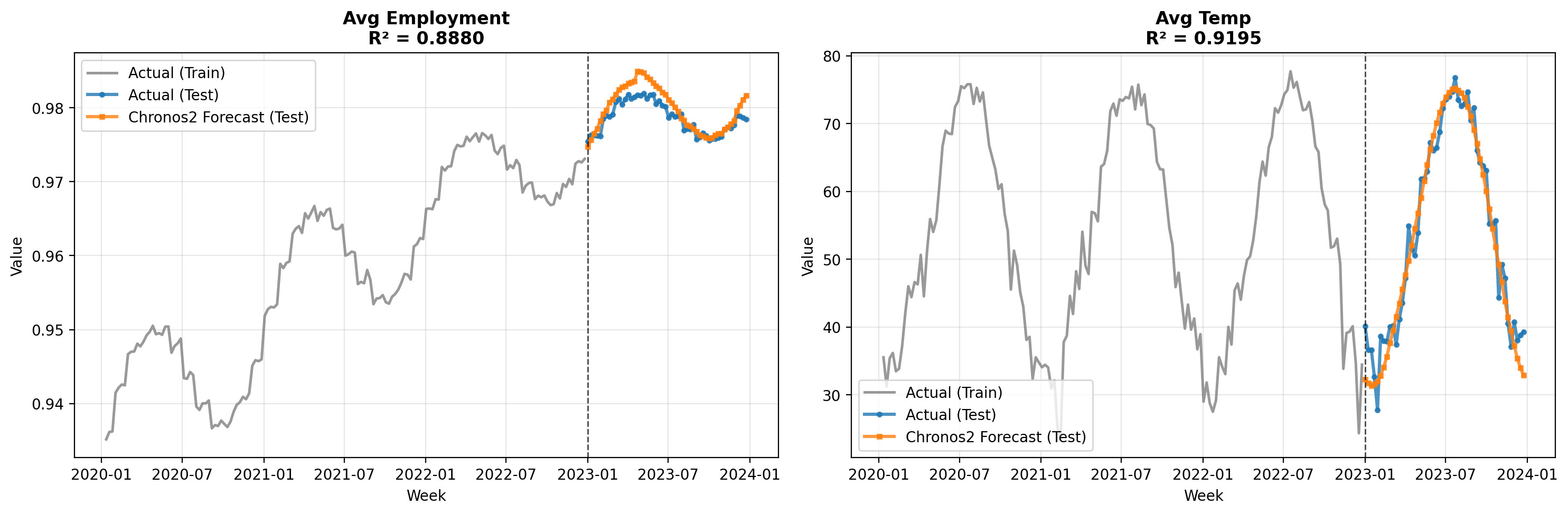
Before using the forecasted controls in the MMM, we evaluate how well Chronos-2 predicted the actual values. This is important because, as we derived earlier, the control forecast MAPE directly affects the MMM prediction accuracy.
The metrics below show the forecast accuracy for each control variable. Pay attention to the MAPE values—these will help us estimate the expected degradation in MMM predictions.
Practical Tip: If the control forecast MAPE is unacceptably high, consider: (1) using a different forecasting model, (2) incorporating external information (e.g., economic forecasts), or (3) reducing the forecast horizon.
Chronos2 Forecast Accuracy Metrics
            Control Variable Forecast Accuracy
┏━━━━━━━━━━━━━━━━━━┳━━━━━━━━┳━━━━━━━━┳━━━━━━━━━━┳━━━━━━━━┓
┃ Control Variable ┃    MAE ┃   RMSE ┃ MAPE (%) ┃     R² ┃
┡━━━━━━━━━━━━━━━━━━╇━━━━━━━━╇━━━━━━━━╇━━━━━━━━━━╇━━━━━━━━┩
│ avg_employment   │ 0.0040 │ 0.0060 │     0.41 │ 0.8880 │
│ avg_temp         │ 4.1882 │ 5.3649 │    15.17 │ 0.9195 │
└──────────────────┴────────┴────────┴──────────┴────────┘
✓ Forecast evaluation complete
control_forecasts_pd.head()
| week | state | avg_employment_forecast | avg_temp_forecast | avg_employment_q10 | avg_temp_q10 | avg_employment_q50 | avg_temp_q50 | avg_employment_q90 | avg_temp_q90 | |
|---|---|---|---|---|---|---|---|---|---|---|
| 0 | 2023-01-01 | Alabama | 0.984375 | 46.75 | 0.980469 | 39.5 | 0.984375 | 46.75 | 0.988281 | 54.00 |
| 1 | 2023-01-08 | Alabama | 0.984375 | 46.50 | 0.984375 | 39.0 | 0.984375 | 46.50 | 0.988281 | 53.75 |
| 2 | 2023-01-15 | Alabama | 0.988281 | 46.50 | 0.984375 | 38.5 | 0.988281 | 46.50 | 0.992188 | 54.00 |
| 3 | 2023-01-22 | Alabama | 0.988281 | 47.25 | 0.988281 | 39.5 | 0.988281 | 47.25 | 0.992188 | 54.50 |
| 4 | 2023-01-29 | Alabama | 0.992188 | 47.75 | 0.988281 | 41.0 | 0.992188 | 47.75 | 0.996094 | 55.25 |
Step 4: Compare MMM Predictions with Actual vs. Forecasted Controls#
Now we arrive at the core experiment. We generate MMM predictions for the test period under two scenarios:
With actual controls: Using the true employment and temperature values (oracle scenario)
With forecasted controls: Using the Chronos-2 forecasts (realistic scenario)
The difference between these two scenarios quantifies the cost of not knowing the true control values. This is the error propagation we analyzed in the theory section.
Generating predictions with ACTUAL controls...
Sampling: [y]
✓ Predictions with actual controls complete
Generating predictions with FORECASTED controls...
Sampling: [y]
✓ Predictions with forecasted controls complete
✓ Results combined: (2650, 8)
Diagnostics (means):
{
    'y_actual_mean': 41946.54018490566,
    'y_pred_actual_mean': 41947.6781761122,
    'y_pred_forecast_mean': 41934.57103661301
}
Diagnostics (pct zeros in predictions):
{'%zeros_pred_actual': 0.0, '%zeros_pred_forecast': 0.0}
             MMM Prediction Error: Actual vs Forecasted Controls
┏━━━━━━━━┳━━━━━━━━━━━━━━━━━━━━━━┳━━━━━━━━━━━━━━━━━━━━━━━━━━┳━━━━━━━━━━━━━━━━━┓
┃ Metric ┃ With Actual Controls ┃ With Forecasted Controls ┃ Degradation (Δ) ┃
┡━━━━━━━━╇━━━━━━━━━━━━━━━━━━━━━━╇━━━━━━━━━━━━━━━━━━━━━━━━━━╇━━━━━━━━━━━━━━━━━┩
│ MAE    │            $3,771.39 │                $3,784.56 │         $+13.18 │
│ RMSE   │            $4,673.19 │                $4,688.66 │         $+15.47 │
│ MAPE   │                9.01% │                    9.04% │          +0.03% │
│ R²     │              -0.9944 │                  -1.0076 │         -0.0132 │
└────────┴──────────────────────┴──────────────────────────┴─────────────────┘
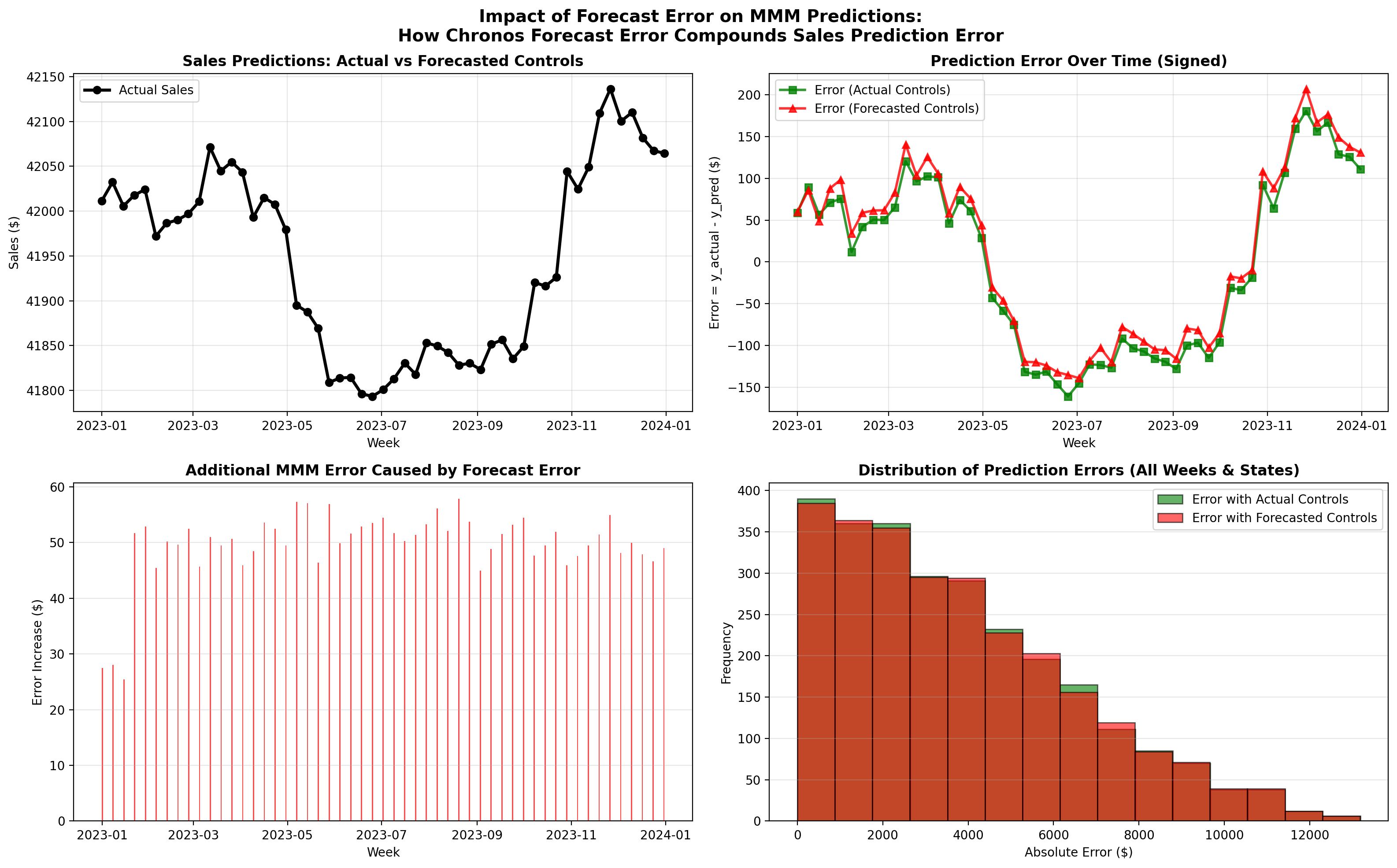
Key Findings:
• Average additional error from forecast: $49.59
• Maximum additional error: $1,299.48
• % of predictions worse with forecasted controls: 50.3%
• MAPE degradation: +0.03%
• RMSE degradation: $+15.47
Interpreting the Results#
The results above demonstrate the error propagation we discussed in the theory section. Recall the rule of thumb:
Incremental MMM MAPE ≈ Control Share × Control MAPE
Worked Example with Our Data#
Using the metrics from this experiment:
Control MAPE (from Chronos-2 forecasts): Check the forecast accuracy table above
Control Share: Estimated from the MMM coefficients and control values
Observed MAPE Degradation: The difference between “With Forecasted Controls” and “With Actual Controls”
The observed degradation should be consistent with the theoretical prediction. If it’s significantly higher, this may indicate:
Non-linear interactions between controls and media effects
Model misspecification
Unusual patterns in the test period
If it’s lower, the model may be robust to control forecast errors, or the controls have limited influence on predictions.
Practical Tips Summary#
This section consolidates the key practical recommendations from this tutorial.
When to Use This Approach#
This two-model approach (MMM + foundational forecasting model) is appropriate when:
Your MMM includes control variables that are unavailable for future periods
The control variables exhibit predictable temporal patterns (seasonality, trends)
You need forward-looking predictions for budget planning or scenario analysis
Consider simpler alternatives when:
Controls have minimal influence on predictions (control share < 10%)
You only need short-term forecasts where last-known values suffice
Control variables are highly volatile and unpredictable
Key Parameters to Tune#
Component |
Parameter |
Recommendation |
|---|---|---|
MMM |
|
1000+ draws, 4 chains for production |
MMM |
|
Match expected carryover duration |
Chronos-2 |
|
Match your planning horizon |
Chronos-2 |
|
Use “cuda” if GPU available |
Expected Accuracy Trade-offs#
Use the rule of thumb to set expectations:
For example:
20% control share × 5% control MAPE = ~1% additional MAPE (acceptable)
40% control share × 15% control MAPE = ~6% additional MAPE (may need improvement)
Common Pitfalls and Solutions#
Pitfall |
Solution |
|---|---|
High control forecast error |
Try different forecasting models, reduce horizon, or use external forecasts |
MMM convergence issues |
Increase tuning iterations, adjust priors, check data quality |
Inconsistent results across runs |
Increase draws and chains, check for multimodality |
Memory issues with Chronos-2 |
Batch forecasts, reduce model size, use CPU if GPU memory limited |
Scaling Considerations#
For large-scale applications:
Many geographic units: The multi-dimensional MMM scales well; Chronos-2 can batch forecasts
Long forecast horizons: Accuracy degrades with horizon; consider rolling forecasts
Real-time updates: Pre-train MMM, update control forecasts as new data arrives
Conclusion#
This tutorial demonstrated how to integrate foundational time series models with PyMC-Marketing MMM to handle the practical challenge of missing control variables in forward-looking predictions.
Key Takeaways#
The problem is common: Control variables (economic indicators, weather, etc.) are often unavailable for future periods, yet they’re essential for accurate MMM predictions.
The solution is modular: By combining a causal model (MMM) with a predictive model (Chronos-2), we leverage the strengths of each—causal understanding from MMM and forecasting accuracy from Chronos-2.
Error propagation is predictable: The rule of thumb (Incremental MAPE ≈ Control Share × Control MAPE) provides a practical way to estimate the cost of using forecasted controls.
The approach is flexible: While we used Chronos-2, the same framework applies to any forecasting method—ARIMA, Prophet, or domain-specific models.
Limitations#
Assumes linear control effects: The error propagation analysis assumes controls enter the model linearly. Non-linear interactions may cause different behavior.
Requires forecastable controls: This approach works best when control variables have predictable patterns. Highly volatile or event-driven controls may not forecast well.
Computational cost: Running both an MMM and a forecasting model adds complexity and compute time.
Next Steps#
For practitioners looking to extend this work:
Experiment with different forecasting models for controls (e.g., Nixtla Models, LightGBM, domain-specific models)
Incorporate uncertainty from control forecasts into MMM predictions
Validate the error propagation rule on your specific data
Consider ensemble approaches that combine multiple control forecasts
References#
Chronos-2: From Univariate to Universal Forecasting - Ansari et al. (2025)
%load_ext watermark
%watermark -n -u -v -iv -w
Last updated: Tue, 20 Jan 2026

Python implementation: CPython
Python version       : 3.12.12
IPython version      : 9.6.0

chronos       : 2.0.0
matplotlib    : 3.10.7
numpy         : 2.3.4
pandas        : 2.3.3
polars        : 1.34.0
pymc_marketing: 0.16.0
rich          : 14.2.0
torch         : 2.9.0

Watermark: 2.6.0